
HRE Mine Engineering: Block Inventory & Drill Progress

We’ve officially moved HRE beyond simple production tracking. Introducing the new Mine Engineering Layer, a powerful upgrade that puts items like Block Inventory, Drill Progression, and Haulage performance into one synchronised view. It’s the single viewpoint you’ve been asking for to manage plan execution without the manual data-heavy lifting.
In this article:
What's in the new layer?
Automated reporting that runs before you get to the site
The outcome
What's in the new layer?
For mine engineers, the first few hours of the day have always been a data-gathering exercise before any real decision-making can start. HRE's new Mine Engineering Layer is built to eliminate that overhead.
Block Inventory & Drill Progression are now visible directly on the map. You can see week plan vs. actuals in real time, track remaining block inventory, monitor drill hole progression, and flag compliance issues: over-drilled, under-drilled, without leaving the platform. No toggling between systems, no manual Excel reconciliation.
Last Known Routes & Road Speeds let your team validate haul times and routes against actual in-field performance ahead of the next weekly plan. If a route assumption is off, you'll know before it affects your targets not after.
Task Assignment is now map-based. Scaling, face prep, clean-up - create and assign tasks directly on the map and track completion through the week.
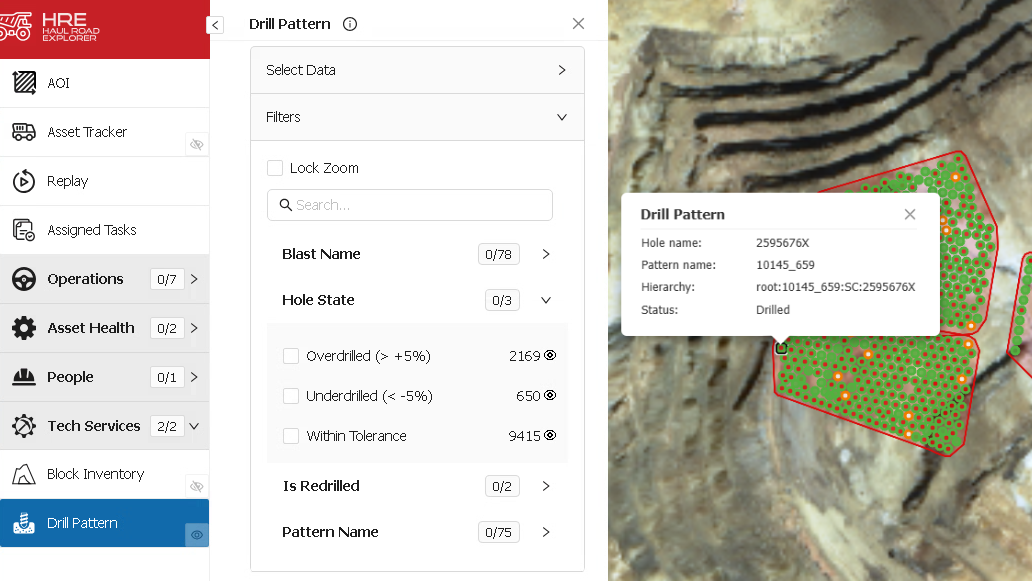
Monitor drill hole progression pattern by pattern, directly on the map. Hole compliance is colour-coded at a glance — green for within tolerance, red/amber for overdrilled or underdrilled. Click any hole to pull up blast name, pattern hierarchy, and drilled status. Spot compliance issues before they become a blasting problem.
Automated reporting that runs before you get to site
Two reporting modules remove the manual prep from your morning meeting:
Daily Planning Meeting Report (PPT + Interactive): A one-click automated PowerPoint covering WTD active routes, loader dig rates, equipment availability, and task tracker status. Ready for your shift-change meeting without a slide being touched.
Mine Planning Key Metrics Report (Scheduled Excel): Automatically delivered to your inbox. Covers hauling performance (loaded A→B, empty C→A), productivity in tonnes/hr, actual vs. target cycle times, and Opportunity Tons lost to underperforming road segments.
The outcome
Block inventory, drill progression, and haulage performance in one synchronised view. Plan deviations identified earlier. Month-end targets defended with data, not gut feel.
